
Operations
This page covers the regular work on an instance that you installed with git clone and Docker Compose: updates, backups, restore, data retention, the health check and the logs. Run every command from the sensora folder you cloned.
Update to a new version
Make a backup. See Back up. The Changelog lists what changed.
Get the new source and rebuild.
bashgit pull docker compose -f deploy/docker-compose.yml up -d --buildCheck the result.
bashdocker compose -f deploy/docker-compose.yml ps curl http://localhost:8090/health
Database migrations run by themselves. The migrate service applies the new ones at every start, and the server starts only after it finished without an error. If the server does not start, read the reason with:
docker compose -f deploy/docker-compose.yml logs migrateThe dashboard and the API are away for a short time while the containers are replaced. Your data stays. Migrations only go forward. To go back to an older version, check out the older source and restore the backup you made before the update. Readings stored after that backup are lost.
INFO
Settings, then Server & storage shows the command docker compose pull && docker compose up -d. That command needs published images, which do not exist yet. Use the commands on this page. A one-command updater will come with published images.
An instance built from source shows dev as its version. To name the exact version, for example in a bug report, print the commit you built from:
git log -1 --format='%h %ad %s' --date=shortBack up
Sensora does not make backups by itself. A complete backup has three parts.
| Part | Holds | How |
|---|---|---|
| The database | Devices, readings, rules, dashboards, customers, settings | pg_dump, below |
| The firmware volume | Images you uploaded for remote updates | tar, below. Skip it if you do not use remote updates. |
deploy/.env | ENCRYPTION_KEY and your other settings | Copy the file to a safe place |
WARNING
A database backup is of little use without the ENCRYPTION_KEY it was made with. Device secrets, API keys and integration secrets in the backup work only with that key.
Back up the database while the stack is running:
docker compose -f deploy/docker-compose.yml exec -T db \
  pg_dump -U postgres -Fc sensora > sensora-$(date +%F).dump
If you changed DB_USER or DB_NAME in deploy/.env, use your values in place of postgres and sensora.
Back up the firmware volume:
docker run --rm \
  -v sensora-oss_sensora-oss-ota:/data:ro \
  -v "$PWD":/backup \
  alpine tar czf /backup/sensora-ota-$(date +%F).tar.gz -C /data .
Run these commands on a schedule, for example from cron, and copy the files to another machine.
Restore
A restore replaces the whole database with the content of a dump file.
On a new machine, first install Sensora with the deploy/.env of the old machine and start it once. The first start creates a database role that the restore needs.
Stop the services that use the database.
bashdocker compose -f deploy/docker-compose.yml stop app webReplace the database with an empty one.
bashdocker compose -f deploy/docker-compose.yml exec -T db \ psql -U postgres -d postgres \ -c "DROP DATABASE IF EXISTS sensora WITH (FORCE)" \ -c "CREATE DATABASE sensora TEMPLATE template0"Load the dump. Use the name of your own file.
bashdocker compose -f deploy/docker-compose.yml exec -T db \ pg_restore -U postgres -d sensora --no-owner < sensora-2026-11-19.dumpStart everything again.
migrateapplies any migration that is newer than the dump.bashdocker compose -f deploy/docker-compose.yml up -dCheck
curl http://localhost:8090/healthand open the dashboard.
To restore the firmware volume:
docker run --rm \
  -v sensora-oss_sensora-oss-ota:/data \
  -v "$PWD":/backup:ro \
  alpine tar xzf /backup/sensora-ota-2026-11-19.tar.gz -C /data
How long data is kept
By default Sensora keeps readings forever. Change this under Settings, then Server & storage, in the Storage section.
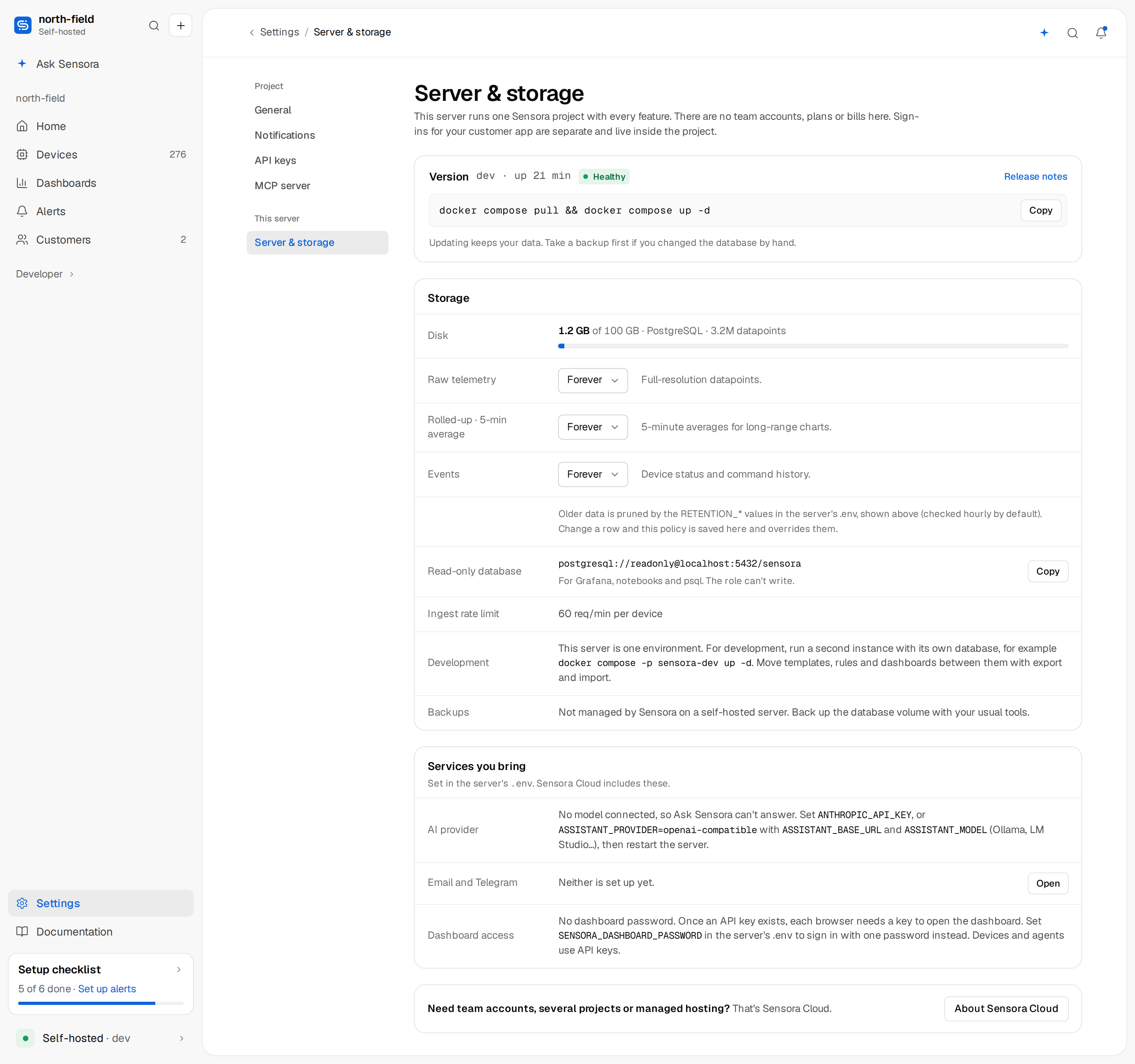
| Row on screen | What it is | Choices |
|---|---|---|
| Raw telemetry | Every reading as it arrived | 30 days, 90 days, 180 days, 1 year, Forever |
| Rolled-up · 5-min average | 5-minute averages, used for charts over long ranges | 6 months, 1 year, 2 years, Forever |
| Events | Device status changes | 7 days, 30 days, 90 days, Forever |
A change is saved at once. A background job deletes older rows shortly after the server starts and then every hour. Deleted data cannot be brought back.
Rule execution logs are kept for 30 days and settled items in an integration's inbox for 7 days. These two have no setting on screen. Configuration lists the RETENTION_ variables for all five.
How much disk readings take
Each value in a message is stored as one reading. A message with temperature and humidity stores two readings.
As a rough measure from a test instance with 3.2 million readings: one reading took about 200 bytes with its indexes, and each 5-minute average took about the same again. The whole database was 1.2 GB and its dump file 56 MB. One device that sends 4 values every minute then needs about 1 MB per day for readings.
The Disk row on screen counts readings, 5-minute averages and events only. The total next to it, "of 100 GB", is the value of the STORAGE_CAP_GB variable and not the size of your disk. Check the real free space on the host:
df -h
docker system df -v
Health check
curl -i http://localhost:8090/health| Answer | Meaning |
|---|---|
200 with {"status":"ok","time":"..."} | The server runs and reaches the database. time is the clock of the server. |
503 with "status":"unavailable" | The server runs and cannot reach the database. |
502 or no answer | The app or web service is not running. |
The path needs no key and no password, so a monitoring service can call it. See Security for what else is public.
Logs
docker compose -f deploy/docker-compose.yml logs -f --tail 100 appUse web, db, broker or migrate in place of app for the other services. The app log has the server start, the MQTT connection, retention runs and errors. The web log has one line per HTTP request.
With Docker's default settings these logs grow without a size limit. Set up log rotation in Docker on an instance that runs for a long time.
What devices and rules did is in the dashboard, under Logs. See Logs.
Stop, start and restart
docker compose -f deploy/docker-compose.yml restart app    # restart the server only
docker compose -f deploy/docker-compose.yml stop           # stop everything, keep data
docker compose -f deploy/docker-compose.yml up -d          # start again
DANGER
docker compose -f deploy/docker-compose.yml down -v deletes the data volumes. Do not use -v unless you want an empty instance.