
Ask Sensora
Ask Sensora is the assistant inside the dashboard. You ask a question in plain words, and it answers from your own devices, readings and rules. This page shows how to connect a model and what leaves your server.
Sensora does not include a language model. You connect your own: an Anthropic API key, or any server with an OpenAI-compatible API such as Ollama. Until you do, the assistant shows Connect a model.
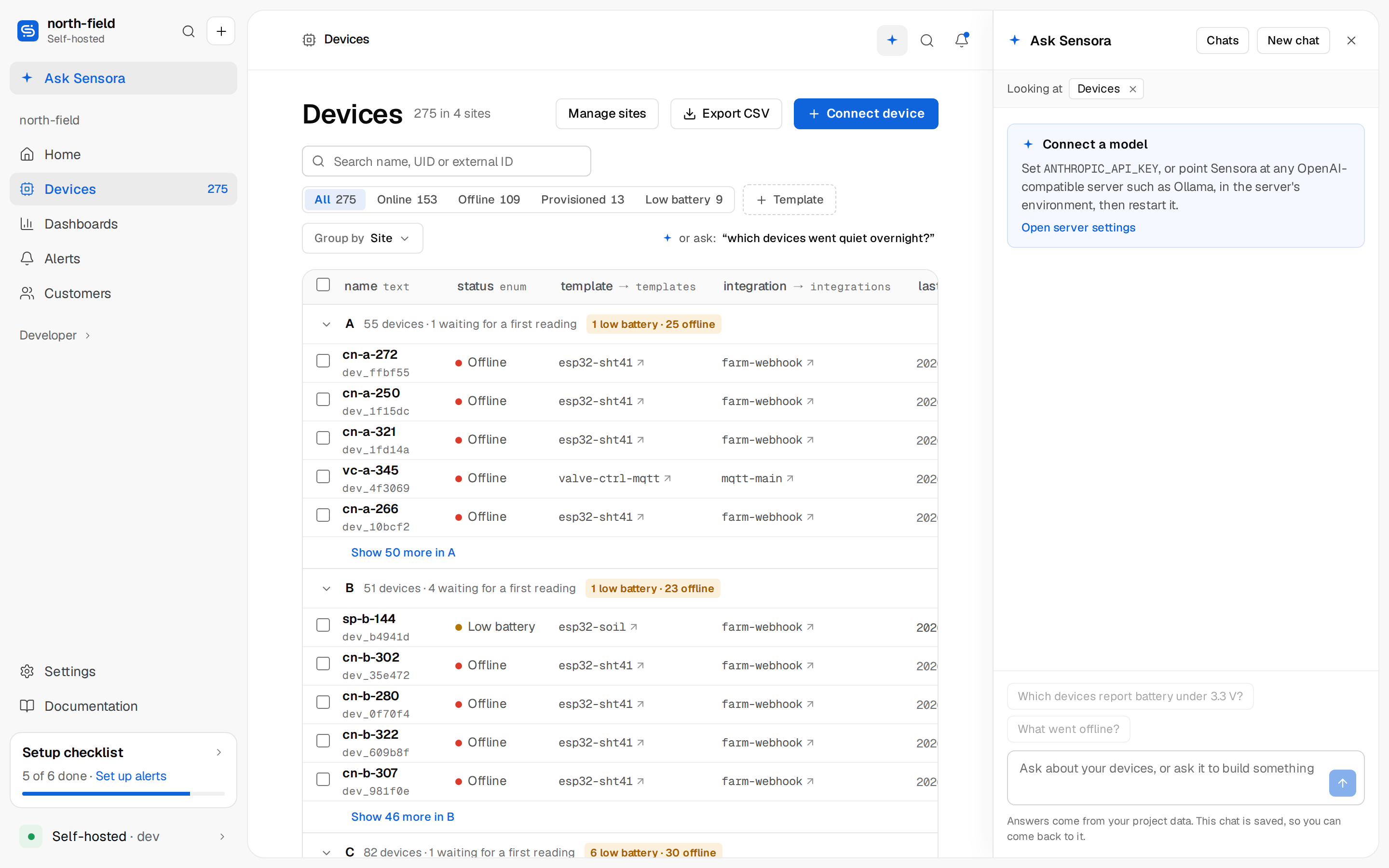
Where it appears
- Ask Sensora in the sidebar and the spark button in the top bar open the assistant panel beside the page. The chips next to "Looking at" show the page context that it uses. You can remove them.
- On Home, type a question in the box at the top.
- On a device page, select Ask about this device.
- In Data, type a question. The assistant proposes one read-only SQL query. You review it, edit it and run it.
Chats are saved on the server. Select Chats in the panel to open or delete one.
What it can do
The assistant reads the live project through 21 of the read-only MCP tools. It cannot create or change devices, templates, integrations or settings, and it answers only about your Sensora project.
Each answer ends with its sources. The server builds that list from the tool calls that were made, not from what the model says.
Ask for an alert and the assistant builds a rule, backtests it over the last 7 days of stored readings and shows it as a card. If you give no number ("alert me when it gets too warm"), it takes one from the history of your devices. Nothing is saved until you select Create rule or Save changes on the card.
A rule you create from a card is your rule
It is saved as made by a person and turned on at once. If one of its notification channels is not set up yet, it is saved paused. A rule that an agent proposes over MCP always waits for approval. See Approvals.
What works without a model
| Feature | Without a model |
|---|---|
| Ask Sensora: the panel, the Home question box, questions in Data | Does not work. Shows Connect a model |
| Describe a dashboard, Describe a widget and Or describe your project | Work. Sensora matches keywords in your description |
| Describing a rule in plain words on the Rules page | Works. It never uses a model |
| Backtests, usual ranges, suggested thresholds, sensor health, rule health | Work. They use stored readings only |
| Agents over MCP | Work. The agent brings its own model |
Connect a model
Add the lines for your provider to
deploy/.env. If the file does not exist yet, copydeploy/.env.exampletodeploy/.envfirst.For Anthropic. The model is
claude-opus-4-8unless you setASSISTANT_MODEL:iniANTHROPIC_API_KEY=sk-ant-...For an OpenAI-compatible server such as Ollama. Add
ASSISTANT_API_KEYonly if the server needs a key:iniASSISTANT_PROVIDER=openai-compatible ASSISTANT_BASE_URL=http://host.docker.internal:11434/v1 ASSISTANT_MODEL=llama3.1Apply the change:
bashdocker compose -f deploy/docker-compose.yml up -dCheck that it worked. The answer has
"ready": trueand never contains the key.bashcurl http://localhost:8090/api/assistant/statusjson{"ready":true,"provider":"anthropic","model":"claude-opus-4-8"}
For your own model server, see also Configuration:
- The address must be reachable from inside the
appcontainer, wherelocalhostmeans the container.host.docker.internalworks with Docker Desktop. On Linux with Docker Engine, use the network address of the machine that runs the model server. - The model must support tool calling.
See how much it is used
On System overview, the AI usage card shows the tokens and the model calls of this month or last month for each feature.
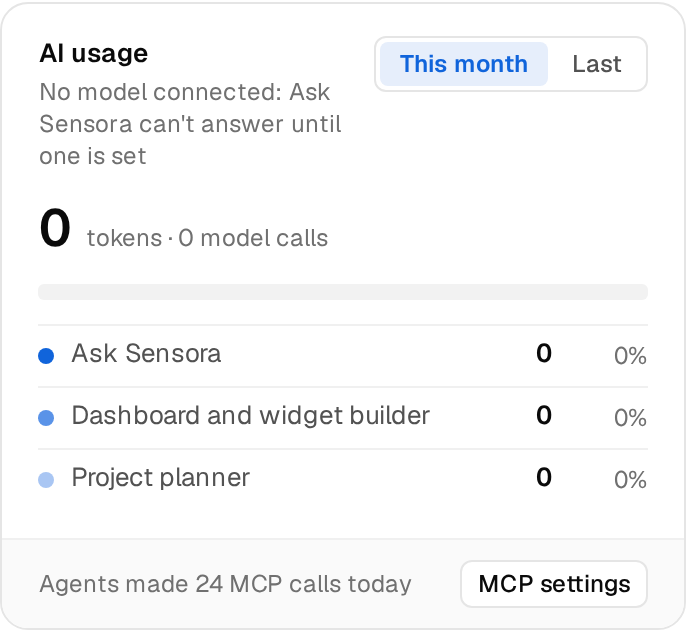
The numbers are the tokens that the provider reported. Sensora does not show prices. MCP calls by agents do not use your model.
What is sent to the model provider
Sensora calls the model only for the three features below, and only when a model is configured. The request goes from your Sensora server to Anthropic, or to the server at ASSISTANT_BASE_URL. If that server runs on your own machine or network, the data stays there.
| Feature | What is sent with each request |
|---|---|
| Ask Sensora chat | The fixed instructions of the assistant and the definitions of its tools. The page context: the page name, the current time, the name and id of the device you are looking at, the page items attached to the question, the number of registered devices, and which notification channels are ready. The whole saved conversation of this chat: your questions, the earlier answers, and the earlier tool calls with their results. The result of every tool that the model calls while it answers |
| Dashboard and widget builder | Your description. The names of all metrics that your devices report, with the number of devices for each. For up to 60 devices: the device id, name, site and metric names. No readings |
| Project planner | The sentence you typed. No project data |
For the chat, the tool results carry your data. Depending on the question, they contain:
- device names, ids, sites, status, battery level, signal strength and firmware version
- stored readings and their averages, for the devices and the time range that the model asks for
- templates and their field mappings
- integrations with their address. For a webhook integration the address contains the webhook token. For MQTT it is the broker address as you entered it, and the topic pattern
- inbox entries: time, status, sender id, note and size
- rules with all their steps. A step can hold a webhook address, a message text or other text that you wrote into it
- rule versions, run history, backtests and health checks
No tool of the assistant returns these: device secrets, API keys, the dashboard password, the signing secret of a webhook integration, the password field of an MQTT integration, and customer accounts. They are sent only if you type them into a question or into a rule.
The result of a SQL query that you run in Data is not sent to the model.
Troubleshooting
| What you see | What to do |
|---|---|
| Connect a model | No model is configured, or the change to deploy/.env was not applied |
| "The model provider refused the API key." | Fix the key in deploy/.env and apply the change |
| "The assistant couldn't finish this answer." | The model server did not answer, or the model cannot call tools |