
Concepts
This page explains the words you meet in the dashboard and the API. Each section is short and links to the page with the details.
How a reading flows
Device over HTTP                 Device or service over a webhook or MQTT
      |                                          |
      |  POST /ingest                            |  integration
      |  uid + secret                            v
      |                                        Inbox ---- no device matches ----> Unmatched
      |                                          |                                (kept for a replay)
      +---------------------+--------------------+
                            v
           Decode with the device's template
           (no template: top-level numbers)  ---- nothing to store ----> error response,
                            |                                            or Failed in the inbox
                            v
                       Rule engine
                       |         |
                       v         v
          Store telemetry      Your alerts and rules
          (built-in rule)      (notify, call a webhook, write a log line)
                       |
                       v
          metrics table in PostgreSQL
                       |
                       v
          Dashboards, device pages, Data, agents
Project and instance
An instance is one running copy of Sensora: the containers and their database. An instance holds exactly one project. The project has a name, which you set in Settings, and it owns everything else on this page.
Sensora has no user accounts. Everyone who opens the dashboard sees the same project. You can protect an instance with one shared dashboard password and with API keys. See Security.
Device
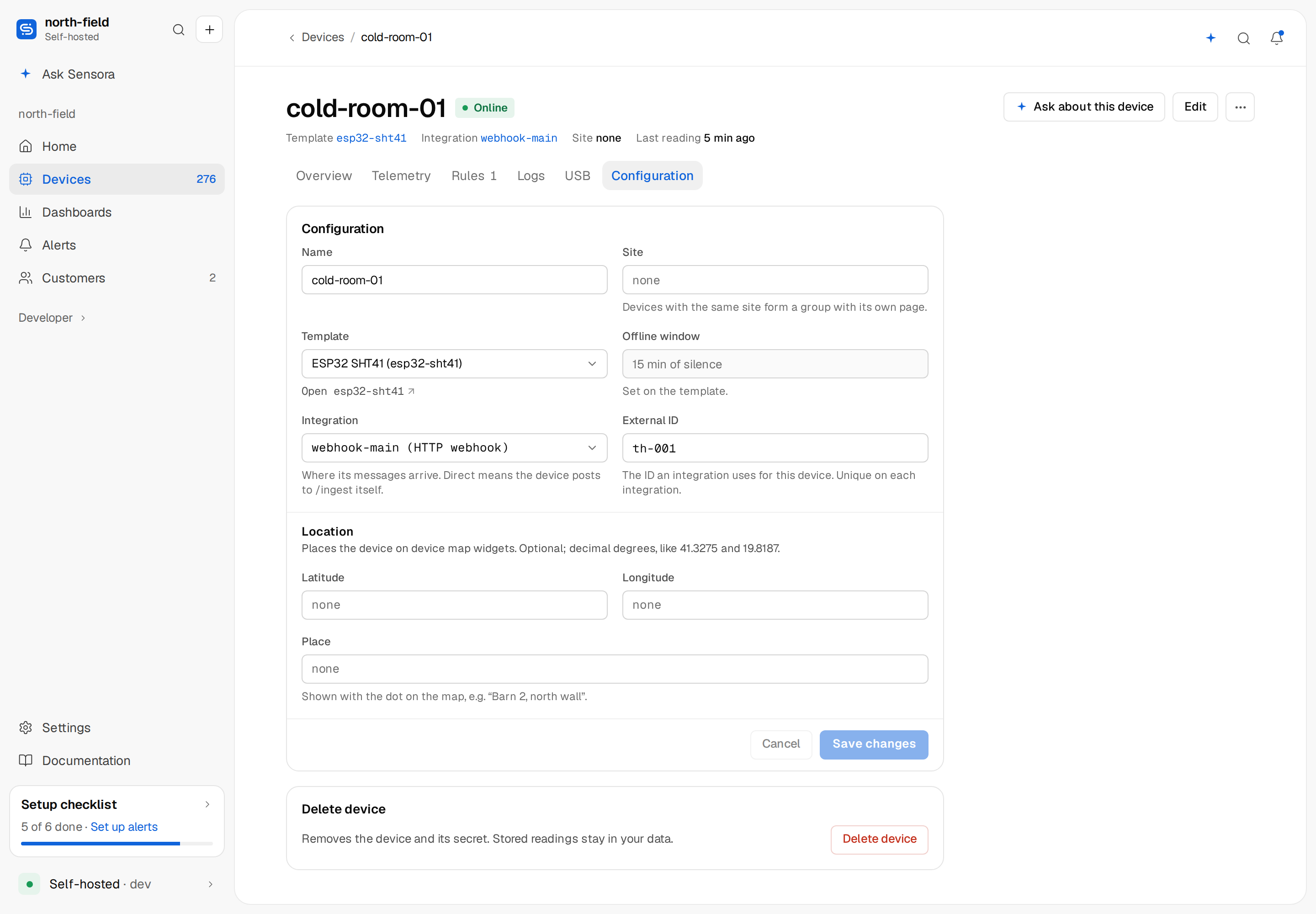
A device is one thing that reports readings: a board, a sensor node, a script. Each device has:
| Field | Example | Meaning |
|---|---|---|
| Name | server-room-01 | What you call it. You can change it. |
device_uid | dev_3833ce1e | The id Sensora gives the device. It never changes. |
| Secret | sec_fd1c…5557 | The password the device sends with device_uid to /ingest. Shown once when you create the device. Sensora stores only a hash. |
| External ID | th-001 | The id that an integration uses for this device, for example the id in a webhook payload or in an MQTT topic. Optional. |
A device also has a status. Provisioned means it exists and has never sent anything. Online means it sent something recently. Offline means it was silent for too long. See Offline devices.
Sensora cannot send commands or settings to a device. Data flows from devices to Sensora only.
To add a device, see Connect your first device.
Template
A template describes what one kind of device sends: the fields, their units, and where each value sits in the JSON payload. It also sets how long a device may be silent before it counts as offline.
Many devices can share one template. A device without a template still works: Sensora stores every top-level number in its payload under the name of the field.
Sensora has a built-in library of 15 templates. You can also write your own or let Sensora propose one from a sample payload. See Templates.
Site
A site is a label on a device, such as Server room or Greenhouse B. Devices with the same site form a group with its own page, and the Devices list groups by site. An alert can watch all devices of one site.
In the API the field is named zone.
Integration and inbox
An integration receives messages for many devices through one entry point. There are two kinds: an HTTP webhook, which has its own URL and a signing secret, and MQTT, which listens on a topic pattern on a broker.
Devices that post to /ingest with their own uid and secret do not need an integration.
Every message that an integration accepts is recorded in its inbox before it is handled. A delivery ends as Processed (readings were stored), Failed (a device matched, but the payload had nothing to store) or Unmatched (no device has the id in the message). Failed and unmatched deliveries stay in the inbox, and you can replay them after you fix the template or create the device. See Webhooks and MQTT.
Metric and reading
A metric is a named series of numbers from one device, such as temperature or battery_v. A reading is one value of a metric at one time.
Sensora stores numbers. true and false are stored as 1 and 0. Text values are not stored.
Readings live in the metrics table in PostgreSQL, one row per value. Sensora also keeps 5-minute averages in metrics_5m. You can query both on the Data page.
Dashboard
A dashboard is a board of widgets that show readings, such as single values, charts and lists. A dashboard can be shared with a public link. See Dashboards.
Alert and rule
A rule is a small graph: a trigger, optional conditions, and one or more actions. A trigger fires on each reading of the devices it names, on a status change, or on a schedule. An action stores data, sends a notification, calls a webhook or writes a log line. See Rule editor.
An alert is a rule of one simple shape: some devices, one condition, and a notification by email or Telegram. Alerts and rules are the same objects, so an alert you make on the Alerts page also appears on the Rules page. See Alerts.
One rule is built in: Store telemetry. It saves every reading from every device. If you turn it off, readings are accepted and not saved.
Sensora also has three built-in alerts that are not rules: device offline, low battery and integration errors. You choose who receives them in Settings. See Notifications.
Agent
An agent is an AI client, such as Claude Code or Cursor, that connects to your project over the Model Context Protocol (MCP). It uses an API key of the kind Agent.
An agent can read the project, register devices and templates, and write rules. It cannot turn a rule on, delete anything or change settings. A rule from an agent starts paused, and a change to a running rule waits as a proposal until a person approves it. See Agents.
Customer
A customer is a person who bought a device from you and claimed it with a claim code. A customer has an account in the customer app and sees only their own devices. This is for people who sell hardware. If you run Sensora only for yourself, you can ignore it. See Selling devices.