
Agents overview
An AI agent such as Claude Code, Claude Desktop or Cursor can work with your Sensora project. This page tells you what an agent can do, what it cannot do, and shows one worked example.
Sensora has a built-in MCP server. MCP (Model Context Protocol) is an open standard that lets an AI client call tools on another system. The server has 35 tools in version 0.1.27, and any MCP client can use it. To set up a client, see Connect an agent.
Agents propose, a person approves
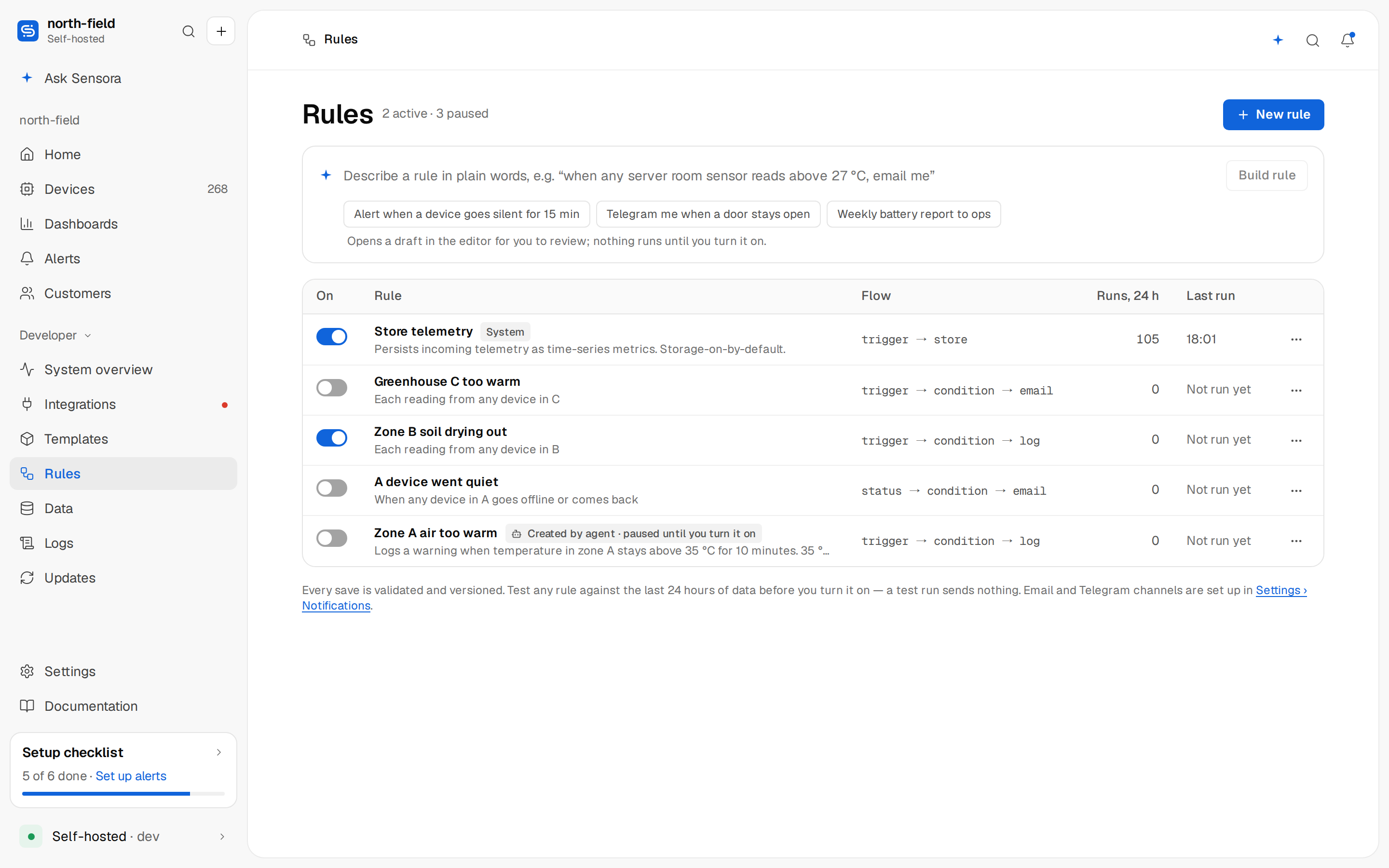
An agent can read your project and set things up. It cannot start a rule running.
- A rule that an agent writes is saved paused. Sensora stores a backtest with it. A backtest replays the rule over the readings that are already stored and reports how often the rule would have fired.
- A change that an agent makes to a rule that is on does not touch the running rule. The change waits beside the rule as a proposal.
- A person reviews it in the dashboard, then approves or discards it. See Approvals.
What an agent can do
| Area | Read | Create or change at once | Waits for a person |
|---|---|---|---|
| Devices | List devices, read one device and its latest values | Create a device. Edit its name, site, template, integration and external id | Nothing |
| Readings | Query stored readings, read a device's usual range, check sensor health, get a threshold from history | Send simulated readings. They are stored and labelled as simulated | Nothing |
| Templates | List and read templates, search the built-in library | Create a template, import one from the library | Nothing |
| Integrations | List and read integrations and their inbox | Create an integration, process a held inbox entry again | Nothing |
| Rules | List and read rules, versions, run history and health. Explain, draft, validate and backtest a rule | Rename a rule, edit its description, pause a rule | A new rule, and any change to the steps of a rule |
The full list is in the MCP tools reference.
What no tool does
These limits are part of the server, not of the agent's prompt.
- No deletes. No tool deletes a device, a template, an integration, a rule or a reading.
- No turning a rule on. The
enable_ruletool always returns the errorneeds_a_personand changes nothing.update_rulewithenabled: truedoes the same. - No commands to devices. Sensora 0.1.27 cannot send a command to a device, and no tool starts a firmware update. A person does that on the Updates page. See Firmware updates.
- No API keys and no settings. An agent cannot create or revoke keys, change notification recipients or change the retention policy.
- No dashboards, customers or claim codes. There are no tools for these.
- The built-in rule stays on.
disable_rulerefuses to pause the system rule "Store telemetry", because that rule stores every reading.
Pausing a rule is the most destructive thing an agent can do. Only a person can turn the rule on again.
Lock the instance and give agents an Agent key
The limits above describe the MCP tools. The HTTP API is a different way in.
- A new instance has no dashboard password and no API keys. Anyone who can reach it can use the whole HTTP API, which includes turning a rule on. The approval step only protects you on a locked instance.
- A Write or Admin key can create, change and delete things over the HTTP API. Give an agent a key with the scope Agent. That key can use the MCP tools and can only read over the HTTP API.
See Connect an agent and Security.
Every call is logged
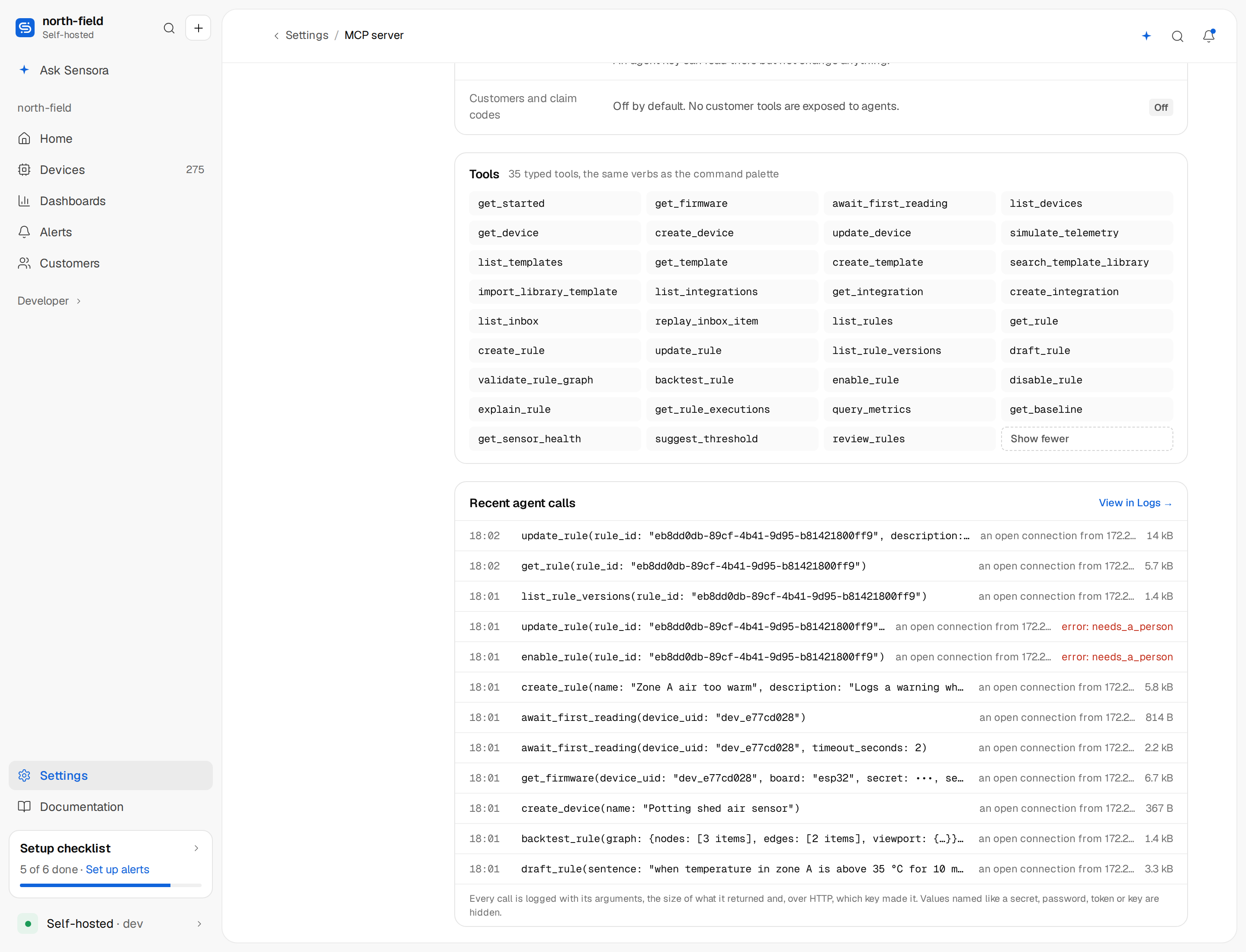
Sensora writes each tool call to Logs with its arguments, the size of the result and who made the call. The newest calls are also under Settings › MCP server › Recent agent calls. A value whose argument name looks like a secret, password, token or key is shown as •••.
A worked example
The agent sets up a new device, then proposes an alert for the devices in site A. The answers are shortened, and your ids and numbers differ.
The agent calls
get_started. The answer is the path to follow.The agent calls
create_devicewith{ "name": "Potting shed air sensor" }. The answer has the device id and its secret. The secret is shown once.json{ "device_uid": "dev_e77cd028", "secret": "sec_..." }The agent calls
get_firmwarewith the device id, the secret, the board (esp32) and the sensor (BME280). The answer is a complete Arduino sketch with install lines. The Wi-Fi name and password are placeholders. A person fills them in and flashes the board. Sensora does not flash a board for an agent.The agent calls
await_first_reading. Before the board is on, the answer is"status": "timeout"with a list of things to check. After the first reading it is:json{ "status": "reading", "device_uid": "dev_e77cd028", "metrics": { "humidity": 61, "pressure": 1009.2, "temperature": 18.4 } }The person asks for an alert when site A gets too warm, without giving a number. The agent calls
suggest_thresholdwith{ "metric": "temperature", "side": "above", "zone": "A" }. The answer is a threshold slightly above the usual range of those devices, for example 35 °C, with the reason in words.The agent calls
draft_rulewith one sentence:"when temperature in zone A is above 35 °C for 10 minutes, log it". The answer is a rule graph with a trigger, a condition and a log action.The agent calls
backtest_rulewith that graph and"hours": 168. The verdict isnever_fired: the rule would not have fired once on the stored readings.The agent calls
create_rulewith a name, the graph and a description that says what the backtest showed. The rule is saved paused.json{ "name": "Zone A air too warm", "enabled": false, "created_by": "agent", "pending_approval": true, "note": "Saved paused, with this backtest as evidence. Nothing runs yet: a person reviews it and turns it on from Rules in the dashboard, and that is recorded as their approval. ..." }The agent tells the person that the rule is waiting. The person opens Rules, reads the backtest and turns the rule on. See Approvals.
Agents and the built-in assistant
"Ask Sensora" is the assistant inside the dashboard. It is a different feature: it uses a model that you connect to the server, and it only reads the project. See Ask Sensora.