
Rule health and history
This page shows you how to go back to an earlier version of a rule, and how to read and act on the flags that Sensora puts on rules that have gone bad since you turned them on.
A rule that was right when you saved it can become wrong later. The room gets warmer and the rule fires all day. A sensor is replaced and the rule watches a device that no longer exists.
Version history
Every save of a rule's name, description or steps is a version. The editor shows the current one next to the name, for example "Version 4 · saved 06:19 PM".
- Open the rule in the rule editor.
- Select History.
- Select Restore next to the version you want.
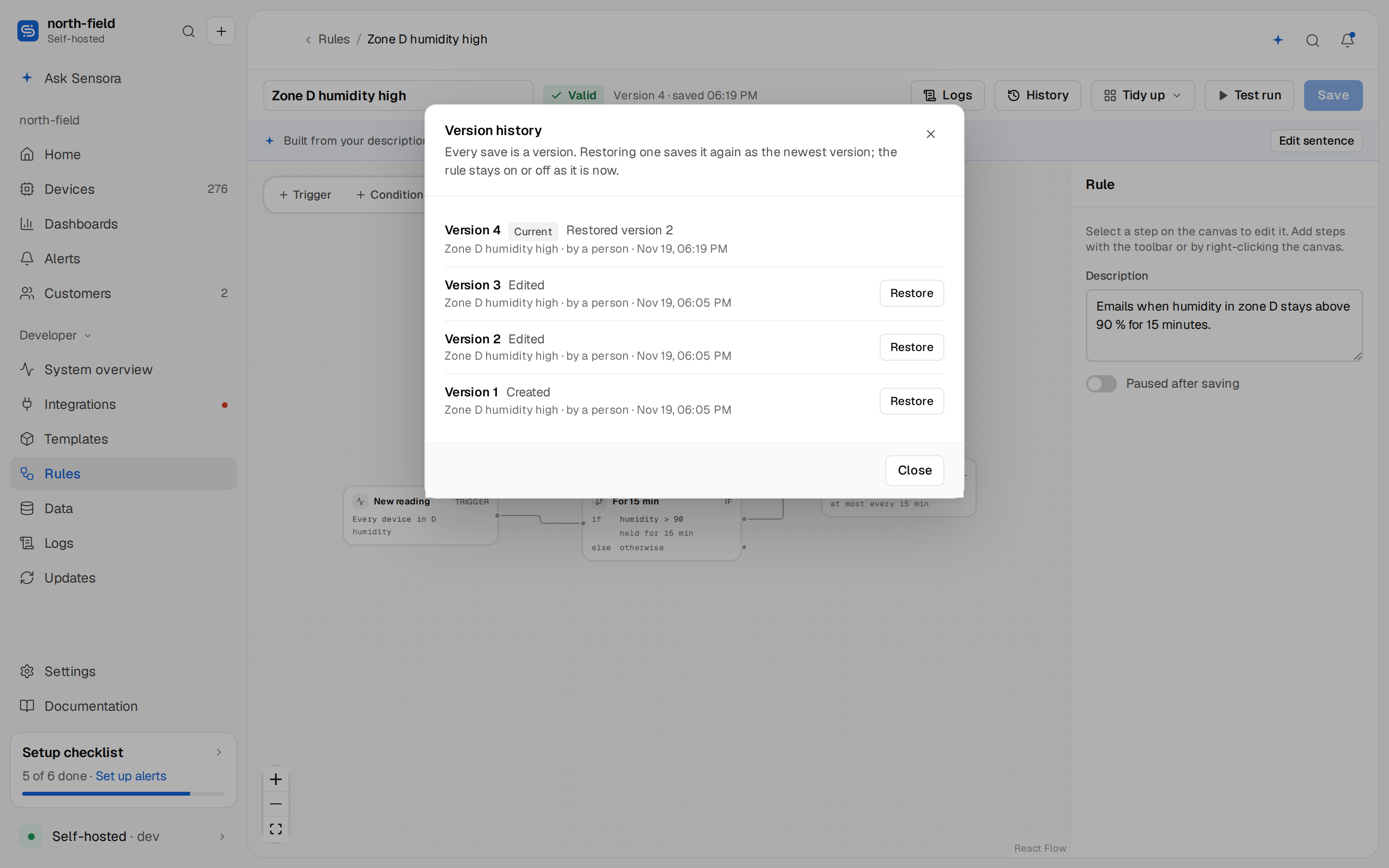
Each row shows the version number, what happened ("Created", "Edited", "Restored version 2"), the name of the rule at that time, whether a person or an agent saved it, and when.
Restoring does not delete anything. Sensora saves the old version again as the newest version, so you can undo a restore by restoring once more.
- The rule stays on or off as it is. A restore never turns a rule on.
- Unsaved changes on the canvas are replaced.
- A restored version of a rule that is on starts running at once.
Versions are also available over the API:
curl http://localhost:8090/api/rules/<id>/versions
curl -X POST http://localhost:8090/api/rules/<id>/versions/2/restore
The weekly rule check
About once a week, Sensora replays each rule that is on over its last 7 days of readings, in the same way as a test run. The check sends nothing and does not change the rule.
- Only rules that are on are checked. The system rule Store telemetry is not checked.
- A rule is left alone for the first 24 hours after you turn it on or change it.
- Simulated readings are left out.
- The first three flags below are raised only for rules that send something: a notification, or a webhook behind a condition.
- A replay reads at most 10,000 readings, so with many devices it can cover less than 7 days.
What the check flags
| Flag | What the check found | What you can do |
|---|---|---|
| Sends too many messages | 10 or more messages a day about one device, or 50 or more a day in total | Use a longer gap between reminders, or a stricter threshold |
| Keeps starting and stopping | The rule started and stopped at least 4 times for one device, 6 or more times a day | Ask for the reading to hold for some minutes, or move the threshold |
| Fires almost all the time | The rule fired on at least half of the readings it checked | Check which way the threshold goes, or move it outside the usual readings |
| Watching nothing | The devices the rule names are gone or silent, or they no longer send the reading the rule waits for | Point the rule at a device that reports, or turn it off |
| Stopped firing | The rule fired on at least 3 days in each of the 3 weeks before, and not once in the last 7 days, while its readings still arrive | Nothing, if the problem is over. Otherwise compare its threshold with the recent readings |
Stopped firing is information, not a warning. The cause may be that the problem is fixed.
Where a flag shows
- On the Rules page and the Alerts page, as a tag on the row with how long it has stood, for example "Sends too many messages · for 3 weeks".
- In the rule editor, as a strip above the canvas. It says what was found, since when, and under What you can do how to fix it.
When the rule compares one reading of one device with a number, the strip can also suggest a threshold. Sensora takes the usual range of that reading on that device over the last 14 days, and tries the new value against the same week before it shows it.
Check again
After you changed a flagged rule, select Check again in the strip. Sensora runs the check now instead of waiting for next week.
- It checks the saved rule, not unsaved changes on the canvas. Save first.
- A rule can be checked once a minute.
- A paused rule cannot be checked. Use Test run instead.
Dismiss a flag
Select Dismiss when you know about the flag and accept it. The flag disappears from the lists and the editor. It comes back when a later check finds something else, or when you change the steps of the rule. The dismissal is written to the rule's Logs.
Over the API
curl http://localhost:8090/api/rules/<id>
curl -X POST http://localhost:8090/api/rules/<id>/health/check
curl -X POST http://localhost:8090/api/rules/<id>/health/dismiss \
  -H "Content-Type: application/json" \
  -d '{"verdict": "noisy"}'
GET /api/rules/<id> returns the result of the last check in health, with a verdict, a summary and a fix. The verdicts are healthy, noisy, flapping, always_firing, watching_nothing, stopped_firing and not_checked. To dismiss, send the verdict you read. If a newer check found something else in the meantime, nothing is dismissed.
How often the check runs
Every 10 minutes the server looks for rules that are due and checks up to 5 of them. A rule is due 7 days after its last check. A rule that could not be judged, for example because it had no readings yet, is tried again after 24 hours.
To turn the weekly check off, set RULE_HEALTH_SWEEP_SEC=0. Check again still works. See Configuration.
Usual ranges of a device
Sensora learns what is normal for each device from its own stored readings: for each numeric reading, the range it usually stays in over the last 14 days.
A usual range shows in two places: suggested alerts on the Alerts page, and the threshold that the strip of a flagged rule suggests.
No screen lists the usual ranges, and a rule cannot compare a reading with "the usual range". A threshold is always a fixed number. Agents can read the ranges through the MCP tool get_baseline. See Agent tools.
Changes made by an agent
An AI agent can write a rule or propose a change, but cannot start it running. What an agent did shows as a tag on the row in Rules and Alerts, as a strip above the canvas in the rule editor, in the Version history, and on the Logs page. To review, approve or discard an agent's work, see Approvals.