
Test a rule
This page shows you how to find out what a rule would have done, without sending anything. You can replay it against stored readings, or run it once with a reading you type.
Both tests are in the Test run panel of the rule editor. They run the rule as it is on the canvas, saved or not.
Replay against stored readings
- Open Developer › Rules and select a rule, or start a new one.
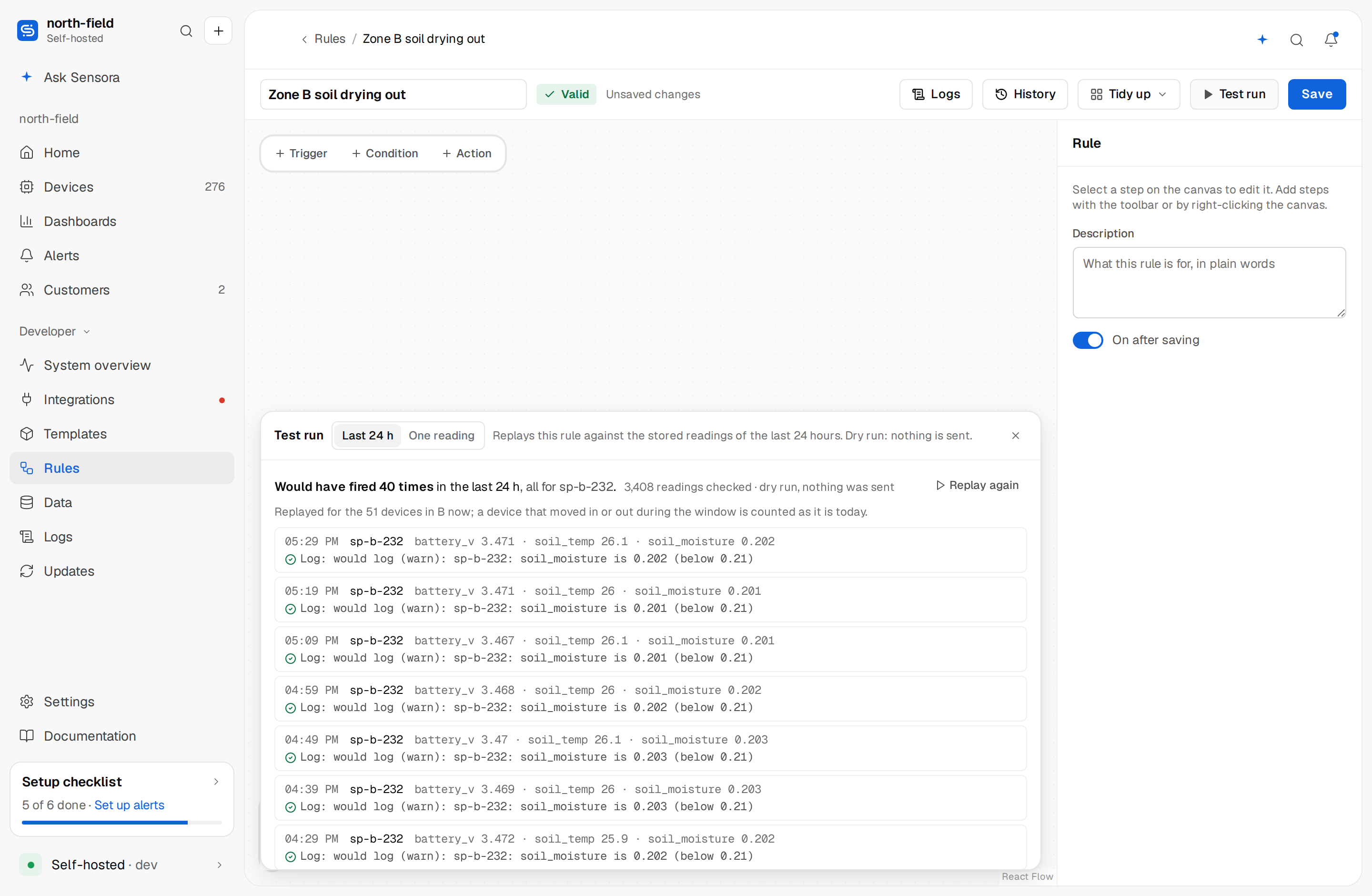
- Select Test run. The panel opens on Last 24 h and the replay starts by itself.
- Read the result. To run it again after a change, select Replay again.
A replay runs the rule on each stored reading from the devices the trigger watches, oldest first. Actions are not carried out. Each action records what it would have done.
Which time windows
| Where | Window |
|---|---|
| Test run in the rule editor | The last 24 hours. The panel offers no other window |
| The preview on New alert | The last 7 days |
| The API | hours from 1 to 168 (7 days). The default is 24 |
Read the result
| Part | Meaning |
|---|---|
| Would have fired 40 times in the last 24 h | The number of readings on which the rule reached an action |
| all for sp-b-232 or across 5 devices | Which devices those readings came from |
| 3,408 readings checked | How many stored readings the rule was run on. One message from one device is one reading |
| dry run, nothing was sent | No email, Telegram message or webhook call was made, and nothing was stored or logged |
| The list | The latest firings, with what each action would have done |
What an action would have done reads like this:
Log: would log (warn): sp-b-232: soil_moisture is 0.202 (below 0.21)
Email: would email 2 people ([email protected], [email protected]): “cn-c-253: temperature is 31.1 °C”
Webhook: would POST https://example.com/hook
A replay applies the cooldown of each Notify step, using the times of the readings. So "fired 133 times" can mean far fewer messages. Lines that say "would send nothing" show which firings the cooldown would have swallowed.
If a channel cannot send, the step is shown as failed with the reason, as it would fail on live readings.
Warnings
Sensora reads the counts and adds one line when the result looks wrong.
| What Sensora found | The line starts with |
|---|---|
| The rule fired on at least half of the readings (with 10 readings or more) | "It fires on most readings, so this describes the normal state, not a problem." |
| It started and stopped at least 4 times for one device, at a rate of 6 or more a day | "The reading hovers around the threshold, so the alert keeps starting and stopping." |
| It would have sent 10 or more messages a day about one device, or 50 or more a day in total | "That is more messages than people keep reading." |
There is no warning when the rule never fired. That can be correct for a rare problem, and it can mean the threshold is outside the range of the reading. Compare the value with a chart of the reading.
A rule with only a Schedule trigger is not replayed, and the panel says so.
Limits of a replay
| Limit | Value |
|---|---|
| Readings replayed | The most recent 10,000 for each trigger |
| Time | The replay stops after 8 seconds |
| Firings in the list | The latest 100. The count is still complete |
When a limit cuts the replay short, the result says so in a line that starts with "Shortened". The counts then cover less time than you asked for. With many devices, 10,000 readings can be much less than a day. To look further back, point the trigger at fewer devices for the test.
A replay is not the same as the past:
- It uses the readings that are stored now. Readings deleted by retention are not there.
- Simulated readings are included.
- A trigger on a site or a template is replayed for the devices that are in it today.
Run with one reading
Use this to see which branch a reading takes, and what message an action would send.
In the Test run panel, select One reading.
Type the reading as JSON in Test reading (JSON). Use the names of your metrics.
json{ "soil_moisture": 0.15, "device_uid": "dev_6bec72" }Select Run with this reading.
The result lists the steps that ran, in order. A condition shows the branch it took. An action shows what it would do. Select a step to see what went into it and what came out.
- A test reading passes every trigger. The device and the Fires on setting of the trigger are not checked.
device_uidis optional. Without it the reading comes from a device namedtest-device.{{input.device_name}}is empty in a test, unless the trigger watches one device.- A condition with "for N minutes" also checks the stored readings of that device.
- Cooldowns are ignored.
Send a real test
Send a real test runs the saved rule once with your reading and carries out its actions: notifications go to their recipients and webhooks are called. Sensora asks you to confirm with Send it.
A real test needs a saved rule with no unsaved changes. It ignores cooldowns and quiet hours, and it waits for the delivery, so the result shows whether the message was accepted.
Test over the API
Replay a saved rule over the last 7 days:
curl -X POST http://localhost:8090/api/rules/<id>/replay \
  -H "Content-Type: application/json" \
  -d '{"hours": 168}'
The answer has the counts evaluated, would_fire and would_send, the latest firings, and an assessment with a verdict and a one-line summary. When a limit cut the replay short, truncated is true.
Run a rule once with a reading:
curl -X POST http://localhost:8090/api/rules/<id>/test \
  -H "Content-Type: application/json" \
  -d '{"dry_run": true, "payload": {"soil_moisture": 0.15}}'
DANGER
Always send "dry_run": true. Without it, and also with an empty body, POST /api/rules/<id>/test is a real test: it sends the notifications and calls the webhooks of the saved rule.
To test a rule that is not saved, send its graph to POST /api/rules/replay or POST /api/rules/test. See API reference. AI agents use the same replay through the MCP tool backtest_rule.